Managing your salary and personal finances becomes easier when you understand how much income tax you may need to pay. Whether you are a salaried employee, a self-employed professional, or a business owner, knowing your estimated tax liability can help you plan your monthly budget and financial goals.
An income tax calculator is a useful online tool that helps you estimate the tax payable on your annual income. Instead of calculating different deductions, exemptions, and tax slabs manually, you can enter your financial details and get an estimated result within seconds.
When I think about financial planning, income tax is one of those things that is easy to postpone until the filing deadline gets closer. However, understanding your tax liability earlier can make a real difference. It helps you decide how much money to save, whether to review your investments, and how much of your salary will actually remain available for everyday expenses.
In India, taxpayers can generally compare the old tax regime with the new tax regime, subject to the applicable rules. Understanding the difference between these options is important because the better choice depends on your income, eligible deductions, exemptions, and financial circumstances.
This guide explains how an income tax calculator works, what information you need, how tax is calculated, and how to use the results for better financial planning in 2026.
What Is an Income Tax Calculator?
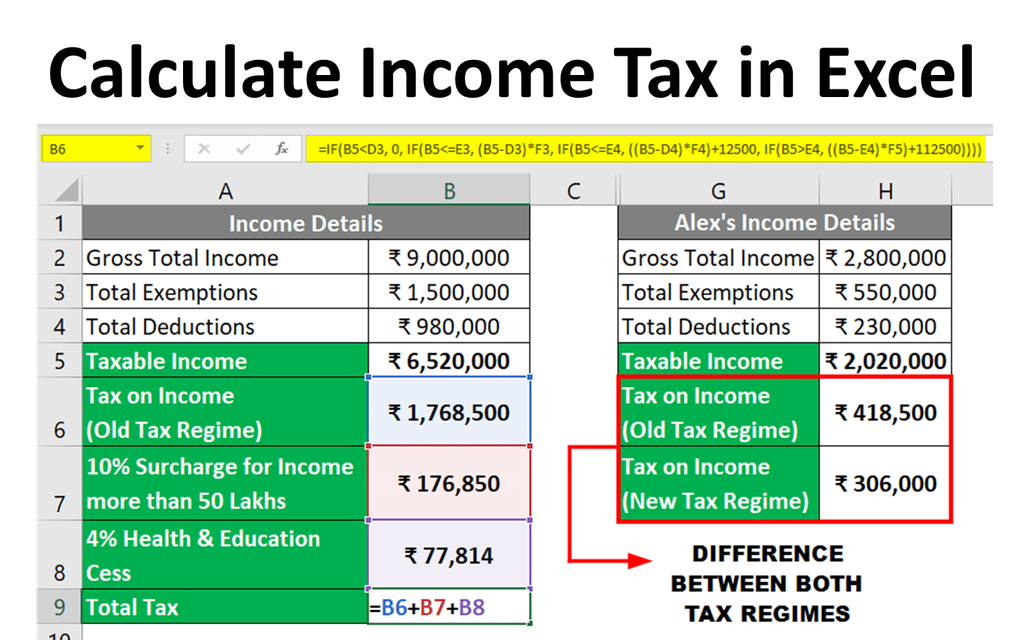
An income tax calculator is an online financial tool that estimates how much income tax an individual needs to pay during a particular tax year. It considers your income, applicable tax rates, eligible deductions, exemptions, and rebates to calculate an estimated tax amount.
In India, the calculator can help you compare the old and new tax regimes. You can enter details such as your annual salary, income from other sources, eligible deductions, and other financial information to understand your estimated tax liability.
The official Income Tax Department also provides an online calculator that allows taxpayers to calculate and compare their tax under both regimes. Income Tax Department+1
Why Should You Use an Income Tax Calculator in 2026?
Understanding income tax is important for anyone who earns money. A calculator makes the process easier because you do not have to calculate every tax slab manually.
1. Estimate Your Annual Tax
You can enter your annual income and get an estimate of your tax liability. This helps you understand how much money you may need to set aside for taxes.
2. Compare the Old and New Tax Regimes
India offers two tax regimes with different tax slabs and deduction rules. An income tax calculator helps you compare both options and understand which one may be more suitable for your financial situation.
3. Plan Your Monthly Budget
Knowing your estimated tax can help you calculate your approximate take-home income. You can plan your rent, household expenses, savings, investments, and other financial commitments more effectively.
4. Understand Tax Deductions
The old tax regime allows eligible deductions and exemptions, while the new regime offers different tax rates with fewer deductions. A calculator helps you understand how these provisions affect your final tax amount.
5. Save Time During Tax Planning
Manual tax calculations can become confusing, especially when you have multiple income sources. An online calculator simplifies the process and gives you a quick estimate.
Income Tax Slabs in India for 2026–27
Before using an income tax calculator, it is important to understand the applicable tax slabs.
For Tax Year 2026–27, India follows the Income-tax Act, 2025, which came into effect on 1 April 2026. The new tax regime remains the default option for eligible taxpayers. Income Tax Department+1
New Tax Regime Slabs for 2026–27
The following slab rates apply to individual taxpayers under the default new tax regime.
| Annual taxable income | Tax rate |
|---|---|
| Up to ₹4,00,000 | Nil |
| ₹4,00,001–₹8,00,000 | 5% |
| ₹8,00,001–₹12,00,000 | 10% |
| ₹12,00,001–₹16,00,000 | 15% |
| ₹16,00,001–₹20,00,000 | 20% |
| ₹20,00,001–₹24,00,000 | 25% |
| Above ₹24,00,000 | 30% |
India Budget+1
Old Tax Regime Slabs for 2026–27
For individuals below 60 years of age, the general old-regime tax slabs are:
| Annual taxable income | Tax rate |
|---|---|
| Up to ₹2,50,000 | Nil |
| ₹2,50,001–₹5,00,000 | 5% |
| ₹5,00,001–₹10,00,000 | 20% |
| Above ₹10,00,000 | 30% |
Senior citizens and super senior citizens who are resident individuals have different basic exemption limits under the old regime. India Budget+1
Old Tax Regime vs New Tax Regime: Which Is Better?
Choosing between the old and new tax regimes is an important part of tax planning. Both options have different benefits, and the right choice depends on your income and financial commitments.
Old Tax Regime
The old tax regime allows eligible taxpayers to claim various deductions and exemptions. These may include investments under Section 80C, eligible health insurance premiums, certain house rent allowances, and eligible home loan benefits.
This option may be useful for people who already make qualifying investments or have substantial eligible deductions.
New Tax Regime
The new tax regime offers lower tax rates across different income brackets. However, most of the popular deductions and exemptions available under the old regime are not available.
It is the default regime and may be suitable for people who prefer a simpler tax structure and do not claim many deductions.
| Feature | Old Tax Regime | New Tax Regime |
|---|---|---|
| Tax rates | Higher slab rates | Lower slab rates |
| Default option | No | Yes |
| Section 80C benefits | Eligible | Generally unavailable |
| Section 80D benefits | Eligible | Generally unavailable |
| HRA exemption | Eligible conditions apply | Generally unavailable |
| Standard deduction for salary | ₹50,000 | ₹75,000 |
| Tax planning | More deduction-focused | Simpler structure |
Income Tax Department+2
The best way to choose is to calculate your tax under both regimes rather than assuming that one is always better.
Using an online income tax calculator is generally straightforward. You only need to provide a few important financial details.
Step 1: Enter Your Annual Income
Start by entering your yearly salary or income. If you earn money from multiple sources, include the relevant details separately.
Step 2: Select Your Tax Year
Choose Tax Year 2026–27 if you want to calculate tax on income earned between 1 April 2026 and 31 March 2027.
Step 3: Select Your Tax Regime
Choose the old or new tax regime. If you are unsure, use a calculator that compares both options.
Step 4: Add Eligible Deductions
If you select the old regime, enter applicable deductions and exemptions. These may include eligible investments, insurance premiums, and housing-related benefits.
Step 5: Enter Tax Details
Add relevant details about tax already deducted from your salary (TDS), advance tax, or self-assessment tax.
Step 6: Calculate Your Tax
Click the calculate option to view your estimated tax liability. Review the final amount and compare the results under both regimes.
The Income Tax Department’s estimator also provides fields for salary, house property, capital gains, business income, other sources, deductions, and tax payments. Income Tax Department+1
Example: Income Tax Calculation on ₹15 Lakh
Let’s understand how an income tax calculator works with a simple example.
Suppose an individual has an annual taxable income of ₹15 lakh and chooses the new tax regime for 2026–27.
The calculation will look like this:
| Income slab | Calculation | Tax amount |
|---|---|---|
| Up to ₹4 lakh | Nil | ₹0 |
| ₹4–8 lakh | 5% of ₹4 lakh | ₹20,000 |
| ₹8–12 lakh | 10% of ₹4 lakh | ₹40,000 |
| ₹12–15 lakh | 15% of ₹3 lakh | ₹45,000 |
| Total income tax | ₹1,05,000 | |
| Health and education cess | 4% | ₹4,200 |
| Total estimated tax | ₹1,09,200 |
Illustration assumes ₹15 lakh is taxable income, no surcharge, no special-rate income, and no other adjustments.
This example shows why calculating tax slab by slab is important. The highest applicable rate is not charged on the entire income. Each rate applies only to the income falling within its respective slab.
Tax Rebate and Standard Deduction in 2026
Tax rebates and standard deductions can make a difference to your final tax liability.
Under Section 156 of the Income-tax Act, 2025, eligible resident individuals under the new regime can receive a rebate of up to ₹60,000 if their taxable income does not exceed ₹12 lakh. Marginal relief is also available in certain cases where income is slightly above ₹12 lakh. IndiaCode+1
Salaried taxpayers can also claim a standard deduction of ₹75,000 under the new regime, subject to applicable conditions. This means an eligible salaried resident individual with salary income of ₹12.75 lakh and no other taxable income may have zero tax liability under the new regime.
Remember that special-rate income, such as certain capital gains, can have different tax treatment. Therefore, the ₹12 lakh rebate should not be treated as a blanket exemption for every type of income.
What Information Do You Need Before Using a Calculator?
Before calculating your income tax, keep your financial details ready. This makes the process faster and helps you get a more accurate estimate.
Some important details include:
- Annual salary or business income.
- Income from house property, if applicable.
- Interest income from savings accounts and deposits.
- Capital gains or other taxable income.
- Eligible deductions and exemptions.
- Tax deducted at source (TDS).
- Advance tax or self-assessment tax already paid.
- Age and residential status.
You do not need to enter every detail for a basic estimate. However, providing complete and accurate information will make the calculation more useful.
How an Income Tax Calculator Helps Salaried Employees
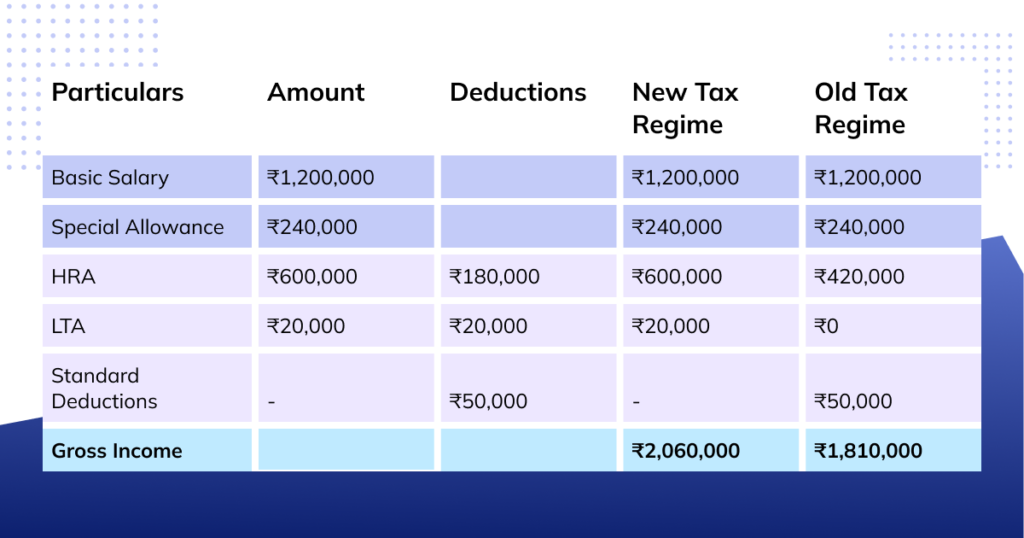
Salaried employees often receive a fixed monthly income, but their annual tax calculation may involve several components. Basic salary, allowances, bonuses, employer contributions, and other benefits can affect taxable income.
An income tax calculator helps employees estimate their yearly tax before the financial year ends.
For example, if you receive a salary increase or annual bonus, you can update your income details and check how your estimated tax changes. This can help you plan your monthly expenses and understand how much TDS your employer may deduct.
It is also useful when changing jobs because your income from two employers during the same tax year may need to be considered together.
Income Tax Planning Tips for 2026
Good tax planning is not just about reducing your tax liability. It is also about managing your income and making informed financial decisions.
Understand Your Salary Structure
Review your salary slip and understand the difference between basic salary, allowances, bonuses, and deductions. This helps you estimate your actual taxable income.
Compare Both Tax Regimes
Do not select a tax regime simply because it is the default option. Calculate your tax under both regimes and consider your eligible deductions before making a decision.
Keep Investment Documents Ready
Maintain records of eligible investments, insurance payments, housing loan interest, and other financial documents. These can help you claim benefits under the applicable tax regime.
Check Your Form 16
Salaried employees should review Form 16 provided by their employer. It contains important information about salary income, deductions, and tax deducted at source.
Review Your Tax Calculation Regularly
If your salary changes, you receive a bonus, or you earn additional income, update your tax estimate. This helps you avoid surprises when filing your return.
My Experience and Thoughts on Using an Income Tax Calculator
One thing I find useful about income tax calculators is how they make financial planning easier to understand. Tax calculations can initially look complicated, especially when you have to consider different income sources, deductions, and tax slabs.
For someone managing a monthly salary, knowing the estimated tax amount can help with everyday financial decisions. For example, before making a new investment or planning a large purchase, it is helpful to understand how much money may be available after accounting for taxes.
I also find the comparison between the old and new tax regimes particularly useful. Instead of guessing which option might save more money, you can enter your income details and compare the estimated results.
Another practical benefit is that you can use the calculator throughout the year. You do not have to wait until tax filing season to understand your financial position.
However, I would always recommend checking the calculation carefully. An online calculator provides an estimate based on the information entered, and certain income types, exemptions, rebates, and special tax provisions may require additional attention.
For me, the biggest advantage is convenience. It makes an otherwise confusing financial task easier to approach and encourages better money management.
Common Mistakes to Avoid While Calculating Income Tax
Even when using an online calculator, small mistakes can affect the estimated tax amount.
One common mistake is entering monthly salary instead of annual salary. Most income tax calculators require yearly income, so always check the input field before calculating.
Another mistake is ignoring additional income. Interest from fixed deposits, rental income, freelance earnings, and capital gains may also need to be included.
Some taxpayers also enter deductions that are not available under their selected tax regime. Always check the applicable rules before including any deduction.
It is also important not to confuse gross salary with taxable income. Eligible standard deductions, exemptions, and other adjustments may change the final amount.
Finally, do not assume that the calculator’s result is your final tax payment. TDS, advance tax, rebates, cess, surcharge, and special tax rates can affect the final liability.
Frequently Asked Questions
1. What is an income tax calculator?
An income tax calculator is an online tool that estimates your tax liability based on your annual income, applicable tax slabs, deductions, and selected tax regime.
2. Is the income tax calculator free to use?
Yes, many online income tax calculators are free. The Income Tax Department also provides an official calculator to help taxpayers estimate their taxes.
3. What is the new tax regime for 2026–27?
The new tax regime is the default tax system for eligible taxpayers in India. It offers seven income slabs, starting with a nil rate up to ₹4 lakh and reaching 30% for taxable income above ₹24 lakh.
4. Can I compare the old and new tax regimes using a calculator?
Yes. Many income tax calculators allow you to enter your income and eligible deductions to compare your estimated tax liability under both regimes.
5. Is income up to ₹12 lakh tax-free in 2026?
Under the new regime, eligible resident individuals can receive a rebate of up to ₹60,000 when their taxable income does not exceed ₹12 lakh. Other conditions and special-rate income rules may apply.
The Insight Zenith team
Written and checked by the people who run Insight Zenith.